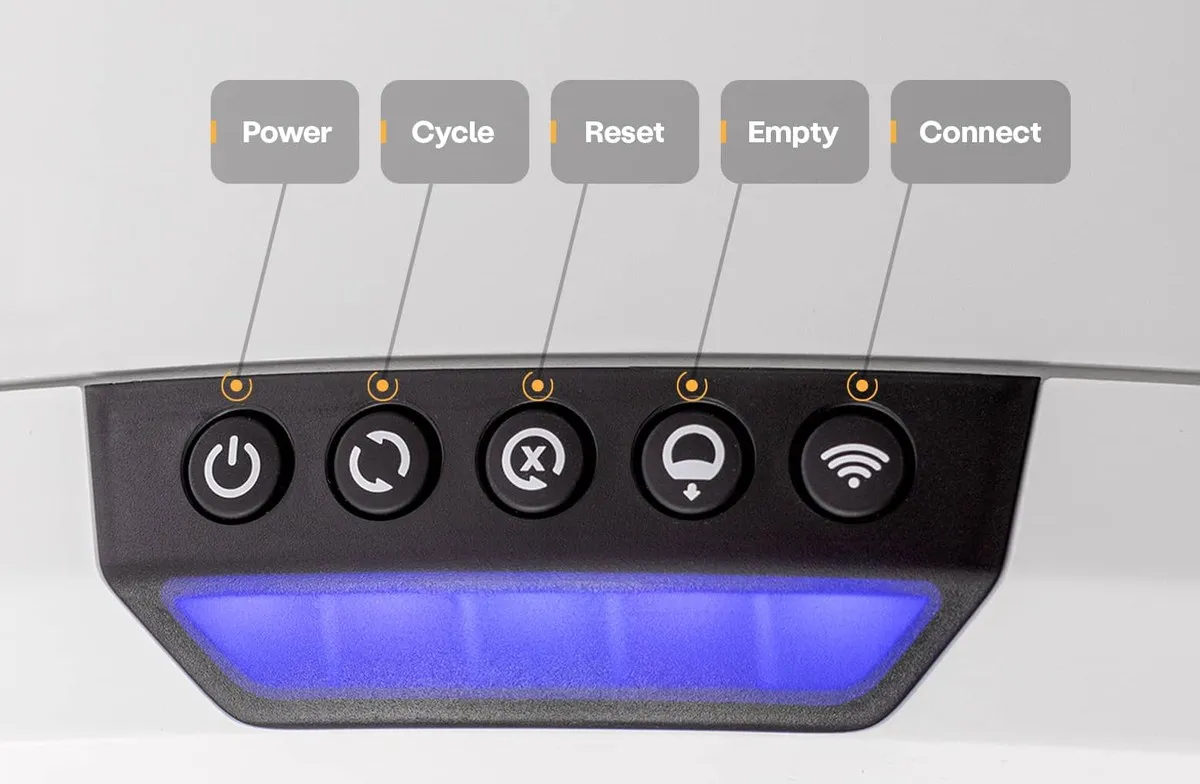
Litter-Robot Blue Light Flashing? Check the 4 Feet First
What a flashing blue bar actually means
The short answer: Whisker’s light code guide says a flashing blue light bar means the waste drawer is full, and the fix listed is to empty it, press Reset, then press Cycle. That answer is right most of the time and incomplete in a way that costs money. The same flashing blue bar with unresponsive buttons can come from a scale foot stuck under the base, and owners told to buy a $50 laser sensor report that the part did not fix anything. Before ordering hardware, spend ten minutes on the four feet, the liner, and the bezel sensors. The unit also cycles twice after it first decides the drawer is full, so a robot that stopped on its own was warning you twice already.
I found this by reading the fallout, not the manual. A September 8, 2026 thread in r/litterrobot runs 28 comments deep on one owner’s robot, and it starts the way most of these do. The unit came back together after a repair, flashed through a rainbow of colors, and settled on a blue bar that blinked and would not stop. Every button on the panel was dead.
The official support account answered in the thread that a whole bar flashing blue means the unit thinks the waste drawer is full. Standard advice. Empty the drawer, reset, cycle.
Then the owner did something more useful than the advice. He wrote that people in his position get told to order a new Omni sensor, that he followed that path, and that the replacement did not fix the fault. His diagnosis after pulling the base apart: one of the weight sensor feet had been pushed in. He cleaned it and the robot recovered. A second comment adds the field test. If the feet do not click when you touch them, or one feels stuck, that is your problem.
Same bar, same color, two different bills. One is a cleaning cloth, the other is a sensor and possibly a base.
petiqlab earns a commission from the Amazon links on this page. Everything below comes from owner threads and Whisker’s own support documentation, both linked in the sources.
What each light code claims, and what the free check is
Whisker publishes a light code guide for the Litter-Robot 4, and reading it end to end is its own education in how many separate faults can look like “the box gave up”. These are the codes that stop a robot from cycling, with the zero-cost check that belongs first.
| Light bar | What Whisker says it means | Free check before parts | When it is genuinely a part |
|---|---|---|---|
| Blue flashing | Waste drawer is full | Pull the liner flat against the drawer walls; Whisker notes dark bags read inaccurately, especially when the drawer is empty | Whisker’s own drawer-sensor page ends at a laser board ($50) or a whole base ($449) |
| Blue with two flashing yellow | The scale has been triggered for more than 30 minutes | Litter below the fill line, robot off carpet, mats, cords and grout lines, nothing touching the walls, then press Reset twice to zero the scale | Scale calibration loss shows as red and green alternating, and Whisker calls that a base replacement |
| Red and blue alternating | The three curtain sensors in the bezel need cleaning | Wipe the bezel, then vacuum the holes at the top with a brush attachment | A laser board, or the fault survives into a base swap |
| Red flashing | Weight or a cat has been detected for over 30 minutes | Check for anything resting on the unit; press Reset to clear the countdown | Long-term false positives point at the scale, not at the cat |
| Blue and white alternating | Motor connection fault, globe rotation affected | Power off, unplug, reseat the motor connector per Whisker’s guide | Motor assembly, listed at $55 in petiqlab’s parts breakdown |
| Blue with a flashing white Connect light | The WiFi chip is defective | Try a re-pair first, and confirm the network is 2.4 GHz | Whisker’s guide for this code says replace the base |
| Red with flashing white | The unit cannot detect the globe position | Reseat the globe and bonnet, clean the bezel | Globe position sensors live in the base |
That last column is the part worth staring at. Some of these codes route an owner straight to a $449 base, and the difference between “the drawer is full” and “the base is finished” is often a lint problem in a place nobody looks.
The four feet: the free check the error code skips
Whisker does document the feet. It is buried in a section of the not-cycling guide about placement, which starts with carpet and litter mats and ends with this line: check that all four feet can move freely, and clear any litter or debris stuck in or around the feet.
Owners arrive at that line last. The thread this article opens with is the reason. The owner was told the drawer was full, and both the chat advice and his own reading sent him toward a sensor purchase. The feet are underneath, out of sight, and the litter that builds up around them is the same litter that gets kicked out of the globe all day.
Here is the version I would run, in order, and it takes about ten minutes.
- Unplug the unit. Nothing in this sequence needs power except the test at the end.
- Press each foot from below. They should move and settle. A foot that will not move, or one that feels compressed compared to its neighbours, matches the fault the owner found.
- Vacuum around all four feet with a brush attachment, then wipe the base underside.
- Check the floor. Whisker’s list is specific: no carpet, no litter mat under the unit, no power cord, no grout line, nothing touching a wall. A mat tucked halfway under the robot is enough to load the scale.
- Put the liner in flat. Whisker’s own drawer documentation opens with the liner, says stretched or unpressed bags cause inaccurate measurements, recommends white over dark, and notes that readings get more accurate as clumps collect.
- Zero the scale. Press Reset twice from the home position, or long press Reset for three seconds if the unit is stuck mid-cycle. That second instruction comes straight from the not-cycling guide.
- Run one manual cycle with Reset then Cycle and watch the bar.
If the bar settles to solid blue, you just saved the price of a sensor and possibly a base. If it does not, you have ruled out the cheap causes, which is what the part decision needs anyway.
When the cycle stops four or five times on the way around
A second September 2026 thread describes the slow failure: stops four or five times per cycle with a red light as if something moved nearby, total cycle time past five minutes, and no automatic cycling at all afterwards. The unit only moves when Reset and Cycle are pressed together.
That combination points at phantom weight readings. Replies in the thread split into three causes and one of them is free.
Sensor dust. The three curtain sensors sit in the bezel above the opening, and Whisker’s own laser-sensor cleaning page exists because dust and cat fur collect there. One owner in the thread argues that a vacuum and an air blower beat cotton swabs, and reports that the waste drawer percentage reads like a new machine after a pass with the blower. That matches what petiqlab found in the year-two parts article, where hair wound around the sensor edge survived q-tips and canned air but came out with a microfiber cloth.
Litter level and scale load. One owner noticed that above roughly half a globe of litter, the robot stumbles on every single cycle. The reply was immediate: that sounds like the weight sensor, so check for litter debris under the base feet. Whisker’s guide carries the same instruction in placement language, and its fix list includes a carpet tray for units that cannot move off soft flooring.
A dying motor. The pessimistic reply in the thread is that a motor on its way out behaves like this, and that a factory reset buys a few days. Two owners landed there. If the free checks change nothing and the bar goes blue and white alternating, the motor code has its own guide, and the part is $55.
There is a test for the scale itself that costs nothing, posted by an owner in the same thread. Press lightly on the top of the unit until the panel light turns red, hold that pressure for 15 seconds, then let go. If the light does not clear back to blue within another 15 seconds, the machine is locked, waiting for the scale before it will cycle on its own. That is a two-minute answer to a question that otherwise goes to a support ticket.
Where the robot stops being broken and starts being offline
Every one of these threads has a sibling thread about WiFi, and the symptoms overlap enough to confuse people. The robot will still cycle and still register a cat with no connection at all. What you lose is the app view, remote control, and firmware updates, which matters more than it sounds, since Whisker pushes fixes over the air and a unit that is offline for months sits on old firmware.
A late-August thread on LR4 dropouts collects fixes, and none of them are on the robot:
- Drop the network to WPA2 only. One owner reports the trouble started when the router advertised WPA2 and WPA3 together, and running a WPA2-only network fixed it.
- Give the unit a dedicated 2.4 GHz network if your router offers one. The robot does not use 5 GHz.
- Turn off airtime fairness on the router. One reply names it as a known troublemaker for always-on devices.
- Put the robot on a smart plug. A remote power cycle fixes a hung WiFi chip without crawling behind the box.
- Check the signal in the app through Update Network, and treat a router juggling too many clients as a valid suspect.
If the WiFi chip itself has failed, Whisker’s code list is blunt about it: a blue bar with a flashing white light next to the Connect button means the chip is defective, and the listed remedy is a replacement base. That is worth knowing before buying a mesh system in response to a hardware fault.
The tail of failure modes ends in the same place
An owner-built sentry published on GitHub frames the whole problem better than any support page, and the thread behind it is worth reading in full. He wrote an open-source sentry for the Litter-Robot, published on GitHub, after his dog discovered that a stalled globe makes an all-you-can-eat buffet and ended up with a cat log stuck under his chin. The line that matters in his write-up is about causes: power outages, flaky pinch sensors, missed cat detection, and every one of them ends with no automatic cycling.
That is the design truth of a self-cleaning box. The failure mode is always the same, and your cat finds out first. Whisker’s own drawer-sensor documentation admits half of it: once the unit decides the drawer is full, it cycles two more times and then stops. If nobody is home to notice, the box becomes furniture.
The owner fix is a monitoring layer, and the arguments for it are cheap. The GitHub project self-hosts or runs inside Home Assistant. A $35 camera with a memory card pointed at the box does the same job without a subscription, which is the configuration petiqlab recommends in the no-subscription camera guide and the cloud-free buying guide. The TP-Link Tapo C210 records to local storage, so the alert does not depend on a company staying in business, which is a real category risk for pet tech.
When the reports stop being about a cheap fix
Not every story in this category is a cleaning job, and the fresh-generation models are where the tone changes. Whisker’s Trustpilot page carries 591 reviews at an average of 3.2, with the company replying to 96% of negative reviews within a week, according to the page’s own badge as read on September 15, 2026. Three recent one-star reviews are worth quoting because they describe the same loop this article is about, minus the happy ending.
An owner of the newest and cheapest model wrote that a weekly litter box cleaning had been replaced by daily babysitting, that the unit errors and hangs during cycles so the cat gets one visit a day unless somebody resets it manually, and that at one point it dumped clean litter into the waste bin. He priced the machine at $100 to $200 of value rather than the $600-plus it costs, and flagged the fine print on returns: shipping is on the buyer, and a unit judged unclean draws an extra $75 cleaning fee.
A household that spent close to $4,000 on two top-model robots plus two hoppers reported that both units keep saying they are full and will not cycle, that both constantly log a “Laser Default” error, and that the hoppers never worked on either machine. Another owner of a sensor-heavy model described the box stuck upside down for hours with the app reset doing nothing, which is the failure that matters most: the cat loses its bathroom until a human intervenes.
petiqlab’s position on the newest Litter-Robot generations stays where it has been. The EVO review found owners steering buyers back to the older model, and the 5 Pro review documented a problem list that includes a safety incident. Neither is a recommendation on this site.
The free-first order, written down
If you are standing in front of a robot that will not cycle, this is the whole sequence with the price attached to each step.
- Empty the drawer and press the liner flat. $0.
- Press Reset twice from home to zero the scale. $0.
- Press all four feet, clear debris, confirm the floor is clear of mats, cords and grout lines. $0.
- Vacuum the bezel and the three sensor holes with a brush attachment, then wipe with a dry cloth. $0.
- Confirm the litter sits below the fill line and the globe is not overloaded. $0. Whisker’s spec is ordinary clumping clay. Owners in a September thread on the brand-specific litter argue the markup buys more uniform granules and little else, and they warn off lightweight types that track and non-clumping types that do not sift.
- Run a manual cycle. If the bar settles blue, stop spending.
- Still flashing? Update firmware, then work through Whisker’s guide for that specific code before buying anything.
- Then, and only then, price the part. A laser board runs $50 and a motor $55, both covered once inside the first-year warranty, and a base is $449, which is where repairing starts competing with replacing.
One more check worth doing with the robot open: look at the seals around the globe. Urine tracking under the base is a documented weak point on high-pee cats, and a smell complaint a month from now is easier to trace if you know what the seals looked like today.
FAQ
What does a flashing blue light on a Litter-Robot 4 mean? Whisker’s light code guide says a flashing blue light bar means the waste drawer is full, and instructs owners to empty it, press Reset, then press Cycle. Two details from the same documentation matter. The unit cycles twice more after the first full reading before it stops automatic cycling, and the drawer sensors read poorly with a dark or unpressed bag, so Whisker recommends white liners pressed flat against the sides.
Why is the blue light still flashing after I emptied the drawer? Owners describe three causes that survive an empty drawer: a liner not pressed flat, dust or cat fur on the three bezel sensors, and scale feet that are stuck or blocked. In a September 2026 thread, an owner told to order a new Omni sensor reported that the part did not fix the light, and that cleaning a pushed-in scale foot did.
What should I test before ordering a laser board or a base? Press each of the four feet and confirm they move, clear any debris around them, and get the unit off carpet, mats, cords and grout lines. Press Reset twice from the home position to zero the scale, and long press Reset for three seconds if the unit is stuck mid-cycle. If the bar is red and green alternating, Whisker states the unit has lost factory scale calibration and the base needs replacing, so that code is where the money decision is already made.
Why does my Litter-Robot stop four or five times during a cycle? It is reading motion or weight that is not there. Clean the three curtain sensors in the bezel with a vacuum brush and an air blower rather than a cotton swab, clear litter from under the scale feet, keep the litter below the fill line, and re-zero the scale. Owners who went through those steps report the drawer percentage reading like new. If the free checks change nothing and the cycle still stalls, the laser board and the motor are the next candidates.
Can I test the weight scale myself? Yes. Whisker’s procedure for a mid-cycle stall is a three-second long press on Reset to zero the scale, or two Reset presses from the home position. One owner posted a longer version: press lightly on the top of the unit until the panel light turns red, hold for 15 seconds, release, and watch whether the light clears to blue within another 15 seconds. If it does not, the unit is still waiting on the scale.
Does a Litter-Robot work without WiFi? Cycling, the cat sensor and the physical panel work without a connection, and the app is not needed to run the box. What you lose is remote control, app history and over-the-air firmware updates. Owners with repeated dropouts report fixes on the router side: WPA2 only instead of mixed WPA2 and WPA3, a dedicated 2.4 GHz network, airtime fairness turned off, and a smart plug for remote power cycling. A chip-level failure shows as a flashing white Connect light, and Whisker’s remedy for that code is a base replacement.
What to buy if the repairs run out
Readers who have priced their way to this point usually ask the same question, so here is the answer this site gives. The PETKIT Purobot Max Pro 2 carries a 2-year warranty, runs ordinary clumping clay rather than a proprietary consumable, and its drawer can be sealed before it is pulled out. Two disclosures travel with that recommendation: cats need an adaptation period, and on the camera version the recorded playback ends after a 30-day trial, leaving live viewing only.
If litter tracking and litter scatter are the reasons you were looking at a robot in the first place, no amount of repair money fixes that, and a large open box with a high lip is the cheaper answer.
Updated: 2026-09-16. Sources: Whisker’s Litter-Robot 4 light code guide (blue flashing equals waste drawer full; blue with two flashing yellow equals the scale triggered for over 30 minutes; red and blue alternating equals curtain sensor cleaning; red and green alternating equals lost factory scale calibration and a base replacement; blue with a flashing white Connect light equals a defective WiFi chip, September 16, 2026), Whisker’s drawer full indicator page (OmniSense laser and weight sensors, the two extra cycles after a full reading, liner flatness and dark bag caveats, the cleaning, firmware, obstruction and globe steps, and the laser board or base endpoint, September 16, 2026), Whisker’s not-cycling guide (cycle delay of 7 minutes, sleep mode, excess weight handling, the four feet check, carpet tray, cat sensor and motor faults, September 16, 2026), Whisker’s red and blue alternating laser board fault page (September 16, 2026), r/litterrobot post 1wa3ap2 (rainbow flash settling into a continuous blue bar with dead buttons, the official reply that a full flashing bar means a full drawer, the owner’s report that a replacement Omni sensor did not fix it and that a pushed-in scale foot did, unresponsive units treated as dumb boxes, September 8, 2026, 28 comments), r/litterrobot post 1wf9elm (four or five stops per cycle with a red light, cycles past five minutes, automatic cycling lost until Reset plus Cycle, the 15-second scale pressure test, sensor dust and air blower experience, the half-full litter observation with litter debris under the scale feet, September 13, 2026, 8 comments), r/LitterRobotCommunity post 1vy0l4h (dropouts fixed with WPA2 only, a dedicated 2.4 GHz network, airtime fairness off, and a smart plug for remote power cycling, August 25, 2026, 5 comments), r/LitterRobotCommunity post 1vsnmqm (open-source sentry on GitHub, the list of failure modes that all end in no automatic cycling, the dog-and-buffet story, August 19, 2026, 10 upvotes), r/LitterRobotCommunity post 1w8fo2h (nine days without power, gnats, Whisker shipping a replacement without collecting the old unit, and the community advice to keep a dead unit for spare parts since the mainboard is not sold separately, September 6, 2026, 4 comments), Trustpilot reviews for litter-robot.com (3.2 average from 591 reviews, replied to 96% of negative reviews typically within a week; the Evo daily-babysitting review from August 29, 2026; the two-unit $4,000 review citing repeated full errors, Laser Default errors and non-working hoppers from August 24, 2026; the upside-down unit review from August 21, 2026; all read September 15, 2026), r/litterrobot post 1w3x2zf (granule size versus price on the brand-specific litter, lightweight and non-clumping warnings, September 1, 2026, 31 comments), and the petiqlab articles linked above. Hero image: official Litter-Robot 4 control panel diagram from Whisker’s support documentation.