Litter-Robot 5 'Drawer Full' Error: 3 UTIs in 2 Months
The short answer: on a Litter-Robot 5, a drawer full message is a sensor reading, not a chore reminder. Whisker’s calibration guide says the curtain sensor in the bezel measures waste across several zones, reports an average, and the robot cycles twice more before it stops automatic cycling until the drawer is emptied. The same guide names what distorts that reading: dark bags, puffy liners, dust and fur, debris, a sticker in the drawer, firmware below 5.8.4. In a five-cat house a stopped box becomes the only box, and Cornell puts a blocked cat on a 24 to 48 hour clock. The fix is cheap. White bags, a dry wipe, calibration, and a plain second box.
The post I keep going back to went up on October 17, 2026, in r/litterrobot. Five cats, two months of ownership, three urinary infections, and an emergency vet visit at midnight that the owner describes while sitting in the waiting room.
What stopped me was the sentence before the vet bill. “I have to keep up with cycling from my phone manually while I’m at work because it’s giving false bin full messages.”
That is the whole problem in one line. The machine did not break. It told him something untrue, and then acted on it.
I read Whisker’s calibration article, the not-cycling article, the error message list, and the use and care guide on October 23, 2026, looking for the part owners are least likely to read. All four documents describe the same device in the same flat tone. None of them hides anything. The information is simply spread across four pages, in the order a technician would need it, not the order a scared owner would.
What does a Litter-Robot 5 drawer full message actually switch off?
Whisker’s error message guide separates two states that look identical on a phone.
| Screen message | Light | What the robot does |
|---|---|---|
| Drawer almost full | Yellow | Keeps cycling, asks you to empty soon |
| Drawer full | Red | Cannot operate until the message is cleared |
The calibration guide adds the number that matters. After reporting a full drawer, “the robot will cycle two additional times before it stops automatic cycling until the drawer is emptied.”
Two cycles. In a house with five cats, that is most of an afternoon. After that the globe sits still and the litter inside is the litter from the last deposit.
The not-cycling guide lists the drawer as the first reason a unit will not cycle, then adds six more: sleep mode, a cat under 3 pounds that the scale cannot see, excess weight or litter above the MAX line, a dirty cat sensor, an uneven floor, and a motor or gear fault. The default cycle delay is 7 minutes, adjustable from 3 to 30 in the app.
Read those together and the failure mode is clear. A false full reading is not cosmetic. It is the same instruction the robot would follow if the drawer really were full, and the robot has no way to check your eyes.
How does the OmniSense sensor behind the Litter-Robot 5 bezel read a bag?
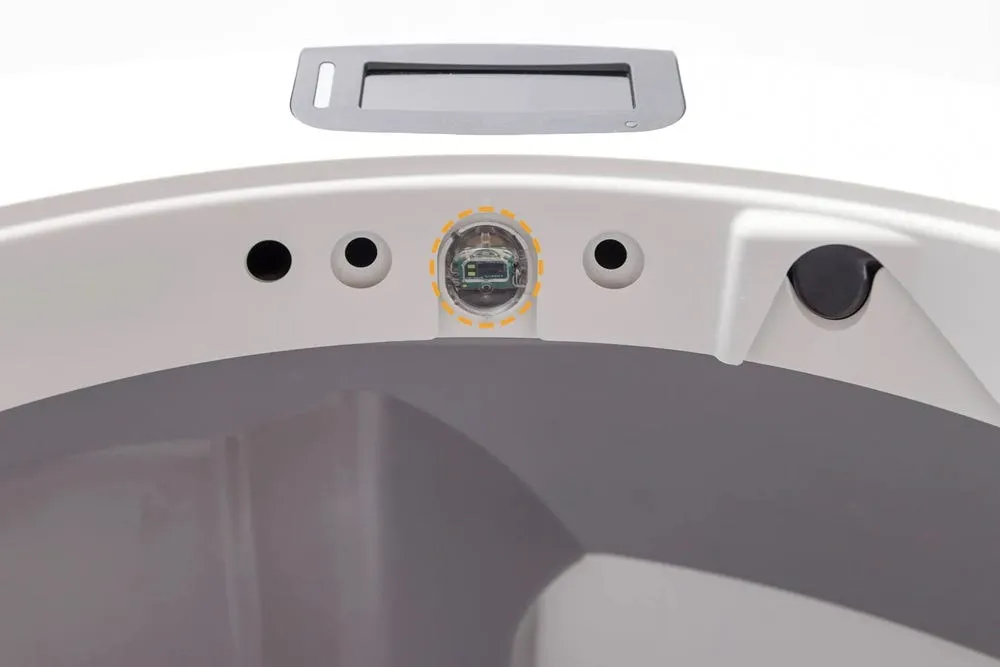
Litter-Robot 5 uses what Whisker calls OmniSense, which the calibration guide describes as optical and weight sensing together. The optical half is a curtain sensor sitting in the bezel above the globe entrance, looking down into the drawer during each Clean Cycle.
It does not measure the peak. The guide is explicit. Waste collects unevenly, may mound in one area, and the robot “measures the waste level across multiple zones and reports an average value. Because of this, the percentage shown may not match the highest point in the drawer. This is normal.”
That design choice is reasonable and it creates a specific blind spot. Anything that changes what the sensor sees changes the number, and the maker’s own pages list a surprising number of those things.
| What the guide names | What it does | What the guide says to do |
|---|---|---|
| Dark trash bag as liner | Inaccurate readings, worst when empty | White 10 to 13 gallon bags |
| Puffy, stretched or wrinkled liner | Curtain sensor reports the wrong level | Press the liner flat into the corners |
| Dust, fur or litter on the curtain sensor | Wrong waste level, false cat detections | Dry microfiber cloth only |
| Sticker or printed logo in the drawer | Reflection confuses calibration | Plain white paper flat on the drawer floor |
| Litter above the MAX fill line | Weight sensors read a cat | Scoop back to the line, press Cancel |
| Mat, cord or grout line under a foot | Scale drifts, cycles stall | Level floor, nothing touching the base |
The cleaning instruction is stricter than most owners expect. Whisker says not to use water, liquids, disinfectant wipes, a vacuum or compressed air on the bezel sensors, because the electronics sit behind that plastic. A dry cloth, and nothing else.
There is also a firmware floor. The calibration guide asks for version 5.8.4 or newer before you start, and if the app shows something older it sends you to customer experience rather than to a download page.
The calibration itself is a five-button sequence that has to be entered without pausing: power off, wait at least 5 seconds, then Connect, Cancel, Connect, Empty, Cycle, each press within 5 seconds of the previous one. Get it right and the unit runs a red, green and blue lamp test, rotates to the dump position, and returns home. Get it wrong and you get an error message and start again.
That sequence is a service procedure, printed for owners because the alternative was a repair ticket.
Litter-Robot 5 uses OmniSense, which Whisker’s calibration guide describes as optical and weight sensing together. The optical half is a curtain sensor in the bezel above the globe entrance, and the sensor measures waste across multiple zones and reports an average value rather than the highest point in the drawer. Whisker names six things that distort the reading: a dark trash bag, a puffy or wrinkled liner, dust and fur on the sensor, a sticker or printed logo in the drawer, litter above the MAX fill line, and a mat, cord or grout line under a foot. Calibration needs firmware 5.8.4 or newer plus a five-button sequence: power off, wait 5 seconds, then Connect, Cancel, Connect, Empty, Cycle, each press within 5 seconds. A full reading gets two additional cycles, then automatic cycling stops until the drawer is emptied.
Where does the risk move when a five-cat Litter-Robot 5 stops cycling?
Cornell’s Feline Health Center page on lower urinary tract disease is blunt about the worst case. Urethral obstruction is “a true medical emergency,” and “the time from complete urinary obstruction until death may be less than twenty-four to forty-eight hours.”
The same page lists what vets see before that point: difficult or painful urination, frequent attempts, crying out, blood, urination outside the box, frequent licking. It also notes that middle-aged, overweight, indoor cats are the usual patients, that male cats carry higher risk, and that a multi-cat household and changes in routine are among the stressors associated with lower urinary tract signs. Its prevention advice includes a line that reads like it was written for this article: cats should be provided “a safe, clean area in which to urinate.”
Now put a stopped globe in that house. Five cats, one machine, a red light, and an owner at work cycling it by hand.
The October 17 owner describes the sequence in his own words. “All I get anymore are waste drawer full notifications, interrupted notifications while cycling, and laser board fault messages multiple times a day and it either won’t cycle, or stops in the middle of one. I’ve tried recalibrating at least 4 times.”
Then the cats. “One of our cats has horrible uti and possible blockage due to him not able to use it with all these error codes constantly going off. I turned that god forsaken machine off and switched back. This is cat number 3 with a uti that has popped up out of no where.”
I want to be careful here, because the post is one household’s account and it does not prove that a litter box caused three infections. Cats get urinary disease for reasons that have nothing to do with hardware, and Cornell’s page says as much. What the post does show is a mechanism any owner can check: when the box stops, the cats lose the clean surface they were using, and the owner finds out at midnight.
Whisker’s official account replied five days later, and the reply is worth reading as a service document rather than a rebuttal. It apologises, offers to troubleshoot, and asks the owner to chat in with the serial number “so we can pull the information needed for the review.” A public reply that asks for a serial number is a public admission that the case needs to be looked at per unit.
What should you test 48 hours before leaving a Litter-Robot 5 alone?
Most of these failures surface at the worst time, which is away from home. The thread is full of owners who found out from a notification with no way to act on it.
A pre-trip check takes about twenty minutes and catches the failures the guides describe:
- Empty the drawer, fit a white 10 to 13 gallon bag, press the liner flat into the corners, and press Cancel to zero the scale.
- Wipe the curtain sensor with a dry microfiber cloth. No spray, no wipes, no vacuum.
- Confirm the firmware reads 5.8.4 or newer in the app.
- Put the unit on a hard, level floor with nothing under the feet, not on a mat, not touching a wall.
- Fill litter only to the MAX line, then run two Clean Cycles and watch the gauge return to a low number.
- Set the drawer to a plain box beside it for the days you are gone.
Whisker’s own emptying schedule explains why a multi-cat house needs that last step more than a single-cat one.
| Cats in the house | Empty the drawer | Deep clean |
|---|---|---|
| 1 | every 10 days | every 3 months |
| 2 | every 5 days | every 2 to 3 months |
| 3 | twice a week | every 2 months |
| 4 to 5 | every other day | monthly |
The product page sells “up to 10 days between emptying the waste drawer in a one-cat household.” That is the top row of this table, and it is the only row the marketing copy prints. At five cats the same machine is a 48-hour appliance, and every false reading costs you one of those 48 hours.
When should you switch a Litter-Robot 5 off and set up a plain box?
The useful signal comes from the cat, and the app is the last place to look.
Cornell’s list of early signs is short and physical: straining, repeated trips, little or no urine, crying in the box, blood, licking. A cat that walks into the globe, turns around, and leaves without squatting is telling you the surface is not acceptable, whether the reason is a stopped globe, a dirty liner or a full drawer.
Two responses, in order. First, stop trusting the machine for the next 24 hours: unplug it, set up a plain box with the same litter, and let the cats use something that cannot issue a message. Second, if a cat is straining or producing nothing, call a vet rather than watching the app. Cornell’s timeline leaves no room for a second night of notifications.
That advice costs nothing and it is the only part of this article that does not depend on which brand you bought.
What does $799 buy, and what does a 96% reply rate not mean?
The Litter-Robot 5 product page, read on October 23, 2026, lists $799, a rating of 4.7 from 276 reviews, a rating for households of up to 5 cats between 3 and 30 pounds, an empty weight of 28.7 pounds, a 90-day in-home trial, and 1 year of warranty with a 3-year plan at $149. The optional LitterHopper is $129 and holds 17.3 cups of litter. Those are fair numbers for the hardware, and none of them describe what happens when the sensor and the drawer disagree.
The Litter-Robot 5 product page, read on October 23, 2026, lists $799, a rating of 4.7 from 276 reviews, a rating for households of up to 5 cats between 3 and 30 pounds, an empty weight of 28.7 pounds, a 90-day in-home trial, and 1 year of warranty with a 3-year plan at $149. The optional LitterHopper is $129 and holds 17.3 cups of litter. Trustpilot’s litter-robot.com profile showed 3.3 out of 5 across 614 reviews on October 23, 2026, with a badge reading Replied to 96% of negative reviews within 1 week. Six days earlier the same page read 3.2 across 613 reviews with 93% replied, so the support metric moved while the complaint cluster did not. Whisker’s emptying schedule runs from every 10 days for one cat to every other day for four or five cats, and the product page prints only the 10-day figure. The PETKIT Purobot Max Pro 2 was $549.99 against a $599.99 list on the same day, with 213 reviews and a 2-year warranty badge.
Trustpilot tells a different story about the same company, and it is the story an owner meets after the sale. litter-robot.com showed 3.3 out of 5 across 614 reviews on October 23, 2026, with the company badge reading “Replied to 96% of negative reviews” within 1 week.
Six days earlier the same page read 3.2 across 613 reviews with 93% replied. One new review in six days, a higher reply rate, and the same cluster of complaints. Whisker answers complaints faster than almost anyone in this category. That number measures the support queue, not the failure rate, and the two should not be confused.
What should a five-cat house buy instead of one $799 robot?
I would not buy a five-cat house a single automatic box, of any brand. The failure in the October 17 thread was a sensor plus a household with no second option.
If you want a drum-style box and the $799 is more than you planned, the PETKIT Purobot Max Pro 2 was $549.99 on sale against a $599.99 list on October 23, 2026, with 213 reviews on the page, a 2-year warranty badge and a larger entry for big or senior cats. Three disclosures travel with that recommendation, and this site has printed them before: the camera’s recorded playback is a 30-day trial that drops to live view after it, owners report that cats need an adjustment period, and its own safety interlock pauses the globe when a cat approaches. It also stops cycling when its drawer reads full, because every box in this category does. Buy it for the price, the warranty and the entry size, not for immunity to the message in this article.
The Amazon listing for the Purobot Max Pro 2 is where most US buyers will end up, and the price moves with coupons.
The second purchase matters more. A plain, uncovered box with the same litter, set up before the automatic one arrives, is the only part of this setup that cannot report a false drawer, cannot lose a firmware version and cannot ask you for a serial number. It is also the thing Cornell’s page is describing when it says a cat should have a clean place to urinate.
If you already own the Litter-Robot 5, the order of operations is cheaper than a new machine: white bags, flat liners, a dry cloth on the curtain sensor, firmware 5.8.4, calibration, and a plain box for travel. This site has covered the mid-cycle lockout on a competitor’s box and the reasons cats refuse an automatic box for the same reason: the machine’s state is only half the story. The other half is what the cat does when the machine is wrong.
For the wider picture on what these machines cost after the first year, the Litter-Robot 4 two-year cost breakdown and the Litter-Robot 5 Pro long-term test are the two files I would read before spending $799. If you are still comparing brands, the smart litter box buying guide puts the drawer logic of each model side by side.
FAQ
Why does my Litter-Robot 5 say the drawer is full when it is empty?
Whisker’s calibration guide, read on October 23, 2026, points at the curtain sensor in the bezel above the globe entrance. It looks down into the drawer during each Clean Cycle and averages several zones, so one high mound does not drive the number on its own. The guide lists the usual causes of a wrong reading: dark bags, a puffy or wrinkled liner, dust and fur on the sensor, debris in its line of sight, a sticker in the drawer, and firmware older than 5.8.4. Calibration is the last step in that document, not the first.
How do I reset the drawer full message?
Empty the drawer, fit a fresh white liner, close it, and short press Cancel. That clears the message and zeroes the weight scale, which Whisker asks for any time you change the weight or placement of the unit. If the message returns with an empty drawer, wipe the curtain sensor with a dry microfiber cloth and run a Clean Cycle. The full calibration sequence comes after that: power off, wait 5 seconds, then Connect, Cancel, Connect, Empty, Cycle, each press within 5 seconds of the one before.
Does the drawer full message stop the robot from cycling?
Not immediately. The calibration guide says the robot cycles two additional times after reporting the drawer full, then stops automatic cycling until the drawer is emptied. Whisker’s error guide classes Drawer full as a red error, meaning the robot cannot operate until it is resolved, and Drawer almost full as a yellow attention message where cycling continues. Those two extra cycles are the whole grace period, and in a five-cat house they go fast.
Can I cycle the box from the app while it says drawer full?
You can start a cycle from the Whisker app. The owner in the October 17 thread did it from work, repeatedly, for two weeks. What you cannot do is make the machine accept a drawer it believes is full for long, because the error state returns on the next reading, and the sensor is still looking at the same drawer. Remote cycling buys hours, not days, and it does not help a cat standing in front of a stopped globe at midnight.
How often should I empty the drawer with five cats?
Whisker’s use and care guide gives four bands: one cat every 10 days, two cats every 5 days, three cats twice a week, four to five cats every other day. The product page advertises up to 10 days between emptyings in a one-cat household, which is the same number at the other end of that table. A five-cat house is on a 48-hour rhythm, and a false full reading interrupts it at the worst possible moment.
Is a stopped litter box dangerous for a cat?
Cornell’s Feline Health Center calls urethral obstruction an absolute emergency and puts the time from complete obstruction to death at under 24 to 48 hours in some cats. It lists a multi-cat household and changes in routine among the stressors linked to lower urinary tract signs, and says cats should have a safe, clean area to urinate. A stopped globe removes that area. Nothing in the public record proves a machine caused an infection, and the precaution costs one plain box.
Is this only a Litter-Robot 5 Pro problem?
The October 17 post carries the Litter-Robot 5 Pro flair, and the owner reports waste drawer full, interrupted cycles and laser board fault. The sensing hardware is shared. Whisker publishes one calibration article titled Litter-Robot 5 and Pro, one error message guide for both models, and one use and care guide for both. The drawer logic, the two extra cycles and the curtain sensor described here therefore apply to the standard Litter-Robot 5 as well.
petiqlab earns a commission from the Amazon links on this page. The Whisker documents, the Cornell page and the Reddit thread were read first-hand on October 23, 2026. The Trustpilot figures were read the same day. Prices here are as of October 23, 2026.