Camera Pet Feeders: 2x Price, Then a Paywall to Watch
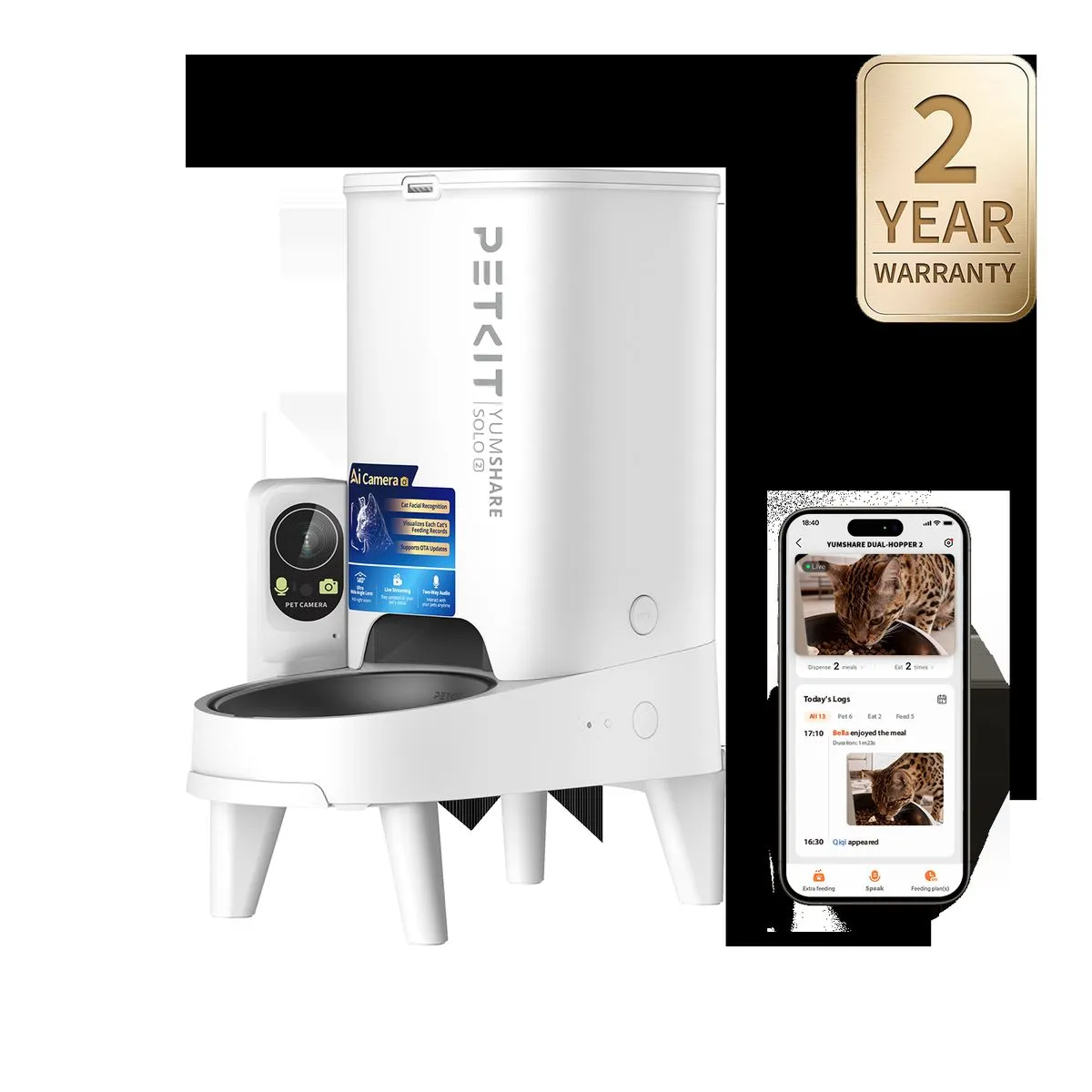
The short answer: the camera version of a pet feeder costs about twice as much as the no-camera model, and the recordings you paid for still sit behind a subscription. PETKIT’s YumShare Solo 2 with camera sells for $149.99 while the same brand’s no-camera Fresh Element Solo sells for $69.99, and owners who bought the camera version found they could only livestream unless they paid a monthly plan. A two-week hands-on Furbo 360 test documented eight separate problems with the camera side of an all-in-one unit. If you want eyes on the bowl, buy a no-camera feeder and a separate $35-40 SD-card camera, which records without a subscription and keeps working when the Wi-Fi dies.
I spent an afternoon reading a two-week field test of the Furbo 360 in r/SmartPetGear, then followed a parallel thread in r/PETKIT where owners were doing something more decisive than complaining: they were returning the camera version of a feeder and buying the no-camera model at half the price. The two stories are the same story at different stages. The Furbo test explains what the camera in an all-in-one unit actually does. The PETKIT thread explains what buyers conclude when they price the alternative.
Why does the camera version cost twice as much?
PETKIT sells the same feeding job at two prices. On its official product page, the YumShare Solo 2 with AI camera lists at $149.99. The Fresh Element Solo, which feeds on schedule without the camera, lists at $69.99. The camera is the difference, and it roughly doubles the machine.
One owner in the r/PETKIT thread put the arithmetic plainly:
We had the Yumshare Solo 2 but ended up returning it for the Freshelement Solo (no camera), which is less than half the price. If we’re already paying extra for a camera that records 24/7, we don’t really think we should also have to pay more just to actually access the footage.
That last clause is the part the marketing pages skip: the camera is why you pay double, and the footage the camera records is what the subscription gates.
What happens to the footage you paid for?
Another buyer in the same thread, SupposablyAtTheZoo, discovered the wall after purchase:
Without paying a monthly payment you cannot watch back ANY videos. Only livestream. Which is absolutely BS and shouldn’t be like this on such an expensive machine. I regret getting it.
PETKIT’s own product page carries the same story in its review section, which is the part worth quoting because it is the vendor’s own wall. JOHN K. wrote: “I ordered two and I was unaware of the subscription requirement to use them as I had hoped… I would have to pay $7/month for each one.” Maria S.S. put it more gently: “You do have to pay for an add on service to obtain certain portions of the videos for reviews later.” And the fine print on the page itself reads: “Certain services may require in-app purchases.” The page also notes the camera is disabled in battery mode, so the feature you paid double for switches off exactly when the feeder is running on backup power, the scenario where remote eyes matter most.
Furbo does the same layering one step further down the funnel. The field test’s author confirmed that live view, 360-degree rotation, barking alerts, two-way audio, night vision, and treat tossing work without a subscription, while “some of the more advanced AI alerts, video history, and daily reports are part of a 14-day Furbo Nanny trial and then require a paid plan.” It is the same architecture petiqlab mapped across the category in the subscription trap map: the free tier exists to make the paywall visible only after setup. The pattern across both brands: the hardware premium buys the lens, and the plan buys what the lens saw.
What does a two-week Furbo 360 test actually find?
The Furbo 360 is a camera-first product, and its owner tested it for two weeks and logged what an all-in-one camera unit gets wrong. The list is worth reading in full before anyone pays a camera premium on a feeder:
- The lid has no real lock. It presses into place, and “if the unit gets bumped, the lid can come loose fairly easily.”
- It is top-heavy. The treat container sits on top and “the base does not feel heavy enough to balance it.”
- The “360” cannot tilt. The camera rotates horizontally but has no up-down movement, so “I never found one placement that was ideal for both viewing and treat tossing.”
- The food-contact tray is not removable. Cleaning meant wiping inside with a paper towel.
- Treat tossing is imprecise. Pieces come out with varying force and count, which the owner said makes it wrong for portioning or training.
- Tossing can trigger competition. The device cannot control which dog gets the treat.
- The pan controls lag. The owner measured a delay “around 10-20 seconds” with sensitive controls that overshoot.
- The AI misfires. Automatic tracking did not follow the dog, and the camera logged the dog as sleeping while it was not home.
His verdict, in his own words: “I now think of it as a pet camera with a fun treat-tossing feature. I wouldn’t treat it as a feeder or rely on it as an accurate record of everything my dog does during the day.” A follow-up commenter in late August sharpened the AI point: Furbo’s AI “isn’t particularly smart; it is better suited for single-pet households or the families who just want to receive occasional snapshots.” For a device that charges double for its camera, that is a thin job description. The full complaint file behind Furbo’s hardware and subscription history is in the Furbo 360 review.
For balance, the PETKIT thread shows the camera version is not all bad. A dual-hopper owner praised details that have nothing to do with the lens: “I like that it alerts me when the hopper runs low/out, that it will not dispense if it detects a certain amount of food available, and that it has space for a dessicant.” Another noted the battery trade-off the spec sheet hides: on batteries you lose options like changing the feed schedule, which matters when the power goes out. Those are feeder problems, not camera problems, and they are exactly the reasons a no-camera feeder plus a separate camera is the cleaner architecture.
What does the wider community conclude?
The same conclusion shows up on a Chinese video platform in the top comment of a 94,944-view feeder roundup, posted May 2025 and holding 1,425 likes:
喂食器带监控的看视频还得买,不如直接买个真的监控插个内存卡呢
Translation: a feeder with a built-in monitor still makes you pay to watch the video, so just buy a real camera and put a memory card in it. One voice in the r/PETKIT thread pushed back that cloud storage costs money by design, the way an iPhone owner pays for iCloud. That is fair as far as it goes. The objection misses the price structure: you are paying double for the camera hardware and then paying again for its output, while a $10-20 microSD card in a separate $35 camera keeps the footage in your hand with no second bill.
When is the camera version worth it?
The camera version is not worthless. It wins in a narrow set of cases, and naming them keeps this honest:
- Single-pet snapshot households. One cat or dog, occasional live checks, no need for reliable multi-day history.
- Treat-tossing as entertainment. If the toss is the point, imprecision is part of the fun.
- Households that will buy cloud history anyway. If you already plan to pay for AI alerts and video history, the all-in-one removes a second device.
- No multi-pet identification needs. The evidence says the AI suits single pets; multi-pet homes get misidentification.
Skip it when you need dependable meal recording, when a battery backup matters (the camera shuts off), when your pets compete over tossed food, or when the budget could instead cover a feeder plus a separate camera that records locally forever.
What should you buy instead?
The split setup beats the all-in-one on the two bills above, and it matches petiqlab’s standing picks, so nothing here flips an earlier verdict.
PetSafe Smart Feed (B07NR47N2Q on Amazon). The feeder half. Schedules run from the device with battery backup, there is no camera to disable and no subscription tier at all. The full feeder comparison explains why it holds up.
TP-Link Tapo C210 (B095CLQ1PT on Amazon, about $35-40). The camera half. Records to a microSD card you own, needs no account and no plan, keeps working when the internet drops, and sits wherever the feeder’s built-in camera cannot. The no-subscription camera guide walks through the full setup, and the cloud-free picks guide explains why local recording survives outages that take subscription cameras offline.
Owners who want to stay in PETKIT’s ecosystem returned the camera version for the half-price no-camera Fresh Element Solo and reported a month of on-schedule, exact-portion feeding with a simple app. Note the record: petiqlab’s August 2026 material logged Wi-Fi drop complaints on that model, so check your home network before buying it. The deeper point stands regardless of brand: the camera should not be the reason the feeder is expensive, because the footage the camera records is the part they rent back to you.
The Furbo owner’s two-week test and the PETKIT return flow end at the same place. A camera bolted onto a feeder makes you pay twice, once for the lens and once for what it sees. A $35 camera with a memory card watches the bowl forever, and the feeder that feeds does not need a lens at all. That is the whole decision.
FAQ
Do pet feeders with cameras require a subscription to watch recordings? On the camera versions, yes for anything beyond live view. PETKIT owners who bought the YumShare Solo 2 found they could livestream but not watch back any recorded video without a monthly plan, and reviews on PETKIT’s own product page confirm it: one buyer said he was unaware of the subscription requirement and would have to pay $7 per month per device, another that you pay for an add-on service to get portions of the video history. Furbo’s 360 model keeps live view free and moves AI alerts, video history, and daily reports behind a 14-day Furbo Nanny trial. A feeder without a camera, or a separate camera that records to a microSD card, has no such plan.
Is a camera version of a pet feeder worth double the price? Usually not. On PETKIT’s own site the YumShare Solo 2 with camera sells for $149.99 while the no-camera Fresh Element Solo sells for $69.99, so the camera roughly doubles the bill. A two-week hands-on Furbo 360 test found the camera side underdelivers: no tilt, a 10-20 second pan delay, a lid without a real lock, and a food tray that cannot be removed for washing. Owners who returned the camera version for the half-price no-camera model reported the simpler feeder worked great. Spend the difference on a $35-40 SD-card camera if you want eyes on the bowl.
What did the two-week Furbo 360 test find wrong with the camera feeder? The owner, testing a self-bought unit, logged eight problems in r/SmartPetGear. The lid presses into place but has no physical lock and comes loose when bumped. The unit sits top-heavy once treats are added. The camera rotates 360 degrees horizontally but cannot tilt, so one placement never serves both viewing and treat tossing. The food-contact tray is not removable, so cleaning means wiping inside with paper towels. Treat tossing is fast but imprecise, with piece counts varying toss to toss, and the owner warned it can trigger competition between dogs. Pan controls have a roughly 10-20 second delay and overshoot. Automatic tracking did not follow the dog, and the AI logged the dog as sleeping while it was not home. His conclusion: it is a pet camera with a fun treat-tossing feature, not a feeder and not a reliable recorder.
What should I buy instead of a camera-version pet feeder? petiqlab’s standing picks hold here. For feeding, PetSafe Smart Feed (B07NR47N2Q) runs schedules from the device with battery backup, no camera and no subscription. For watching the bowl, a separate TP-Link Tapo C210 (B095CLQ1PT, about $35-40) records to a microSD card with no account and no plan, which matches what a top comment on a 94,000-view feeder roundup said in Chinese: a feeder with a built-in monitor still makes you pay for the video, so just buy a real camera and put a memory card in it. Owners in the PETKIT subreddit who returned the camera version went to the half-price no-camera Fresh Element Solo; note petiqlab’s August 2026 report of Wi-Fi complaints on that model, so verify your home network before buying it.
When does the camera version of a pet feeder make sense? The camera version earns its premium in a narrow set of cases: a single pet that you mostly want live snapshots of, treat tossing as entertainment, or a household that will pay for cloud history anyway. The Furbo 360 owner’s follow-up said the AI is suited to single-pet households that want occasional snapshots, not multi-pet homes that need reliable identification. Skip the camera version when you need dependable meal recording, when you have multiple pets, when battery operation matters (PETKIT disables the camera in battery mode), or when the budget could instead buy a feeder plus a real SD-card camera, which keeps working offline and never asks for a plan.
Updated: 2026-09-06. Sources: r/SmartPetGear thread 1vu5rsn (Furbo 360° two-week hands-on test, August 21-31, 2026), r/PETKIT thread 1vmjqo4 (YumShare Solo 2 camera-version returns, August 12-17, 2026), PETKIT product pages for YumShare Solo 2 and Fresh Element Solo (prices and review section accessed September 6, 2026), Bilibili video BV1evJ8zzEJs top comment (1,425 likes, translated by petiqlab), and the petiqlab reviews linked above. Chinese comments translated by petiqlab.